Used by 8,000+ creators
Money Counter Animation Generator
Type an amount, pick a currency symbol, and watch it count up from zero to the exact figure on a clean card. A free 1080p MP4 for CapCut, Reels and Shorts.
Free, no sign-up
By Sumit DeyUpdated
What is the Money Counter Animation?
A money counter animation counts a sum of money up from zero to its final amount. This one sits on a card with a title above the figure, an optional change chip like +18% below it, and a small note at the bottom.
How it works
The card appears with your title, then the amount counts up from zero to your figure with the thousands grouped, and holds. You set the currency symbol, whole units or two decimals, a suffix like /mo, the card colours and how long the count takes.
Made for
- Income and revenue reports
- Savings and personal finance videos
- Case study results and client wins
- Fundraising totals and goals
- Price and cost breakdowns
Money Counter Animation in three steps
Step 01
Type the amount and currency
Enter the figure, the currency symbol and a title above it, like Saved this year or Revenue in March.
Step 02
Add context and colours
Choose whole units or two decimals, add a suffix like /mo, a change chip and a note, then pick the colours.
Step 03
Export the MP4
Set how long the count takes, pick 9:16, 16:9 or 1:1, and download a 1080p MP4 with no sign-up.

Using the money counter in CapCut, Premiere Pro or a green screen workflow
There is no green screen export, and most of the time you do not need one. Here is how the card fits into the editors creators use.
- 1
Use it as a cutaway
The card is a complete graphic on its own background. Cut to it for two or three seconds between talking shots, then cut back.
- 2
Shrink it into a corner
In CapCut or Premiere, scale the card down and place it beside the speaker as picture in picture while you talk about the figure.
- 3
Over footage in the editor
Inside the VideoCaptions.AI editor the money counter sits directly on your video alongside your captions, with nothing to key out.
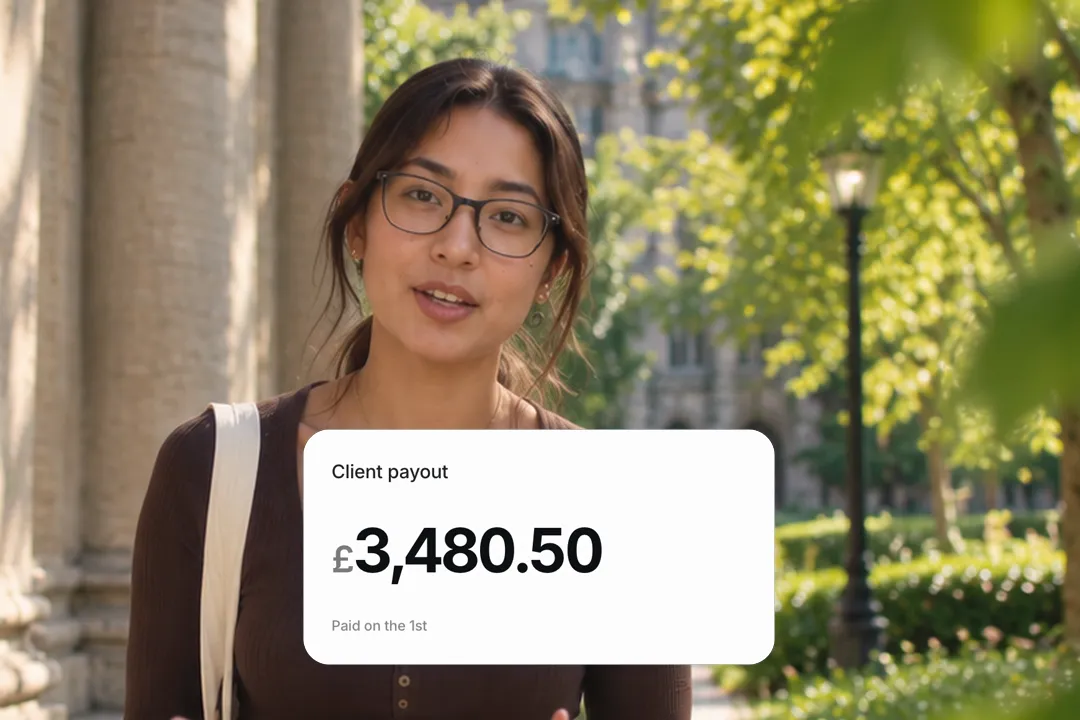
Formatting the amount: currency, decimals and the per-period suffix
A money figure only persuades if it reads correctly at a glance, in the short moment before the next cut arrives. Three settings handle that.
- 1
Any currency symbol
The currency is a text field, so $, €, £, ₹, ¥ or a code like AED all work. The digits group into thousands automatically.
- 2
Whole units or cents
Use whole units for big round results and two decimals for prices and exact payouts, where the cents make it believable.
- 3
A suffix for recurring money
Add /mo, /yr or per client after the figure. $4,200/mo says something very different from $4,200 alone.

Money counter or number counter: which one to use
VideoCaptions.AI has two counting elements, and they suit different kinds of video. Pick by how much context the figure needs.
- 1
The money counter is a card
It carries a title, a change chip and a note around the figure, which is ideal when the number needs context to mean anything.
- 2
The number counter is bare digits
The number counter animation is an odometer-style figure with rolling columns and no card, for stats that should fill the frame.
- 3
Counting down needs the number counter
The money card always counts up. For a price dropping or costs falling, use the number counter with its direction set to down.

Money stories that land
The figure is the hook, but the framing around it is what makes people believe the number and keep watching to hear how you got there.
- 1
Say the timeframe
A title like First 30 days or Saved in 2026 turns a bare number into a story with a beginning and an end.
- 2
Use the chip for the comparison
A chip reading +18% vs last year answers is that good before the viewer can ask it.
- 3
Keep the count short
One to two seconds of counting is enough on short video. A longer count feels slow once viewers know where it is heading.

Best Platforms for Money Counter Animation
- 1
YouTube Shorts
Finance and side-hustle Shorts lead with a number. A money card counting up in the first second is the hook those viewers expect.
- 2
Instagram Reels
Income and savings reveals perform on Reels. The card format keeps the figure readable over any background or footage.
- 3
LinkedIn
Revenue milestones and client results read as credible on a clean card, with the change chip giving the context in one glance.
Money Counter Animation, answered
Can I make a money counter animation that counts down instead of up?
The money card always counts up from zero to your amount. For a figure that falls, such as a price drop or costs cut, use the number counter animation with its direction set to down.
Does it work with rupees, euros or other currencies?
Yes. The currency symbol is a text field, so ₹, €, £, ¥ or any code works. Digits are grouped in thousands, and you can show whole units or two decimals.
Is there a green screen or transparent version for CapCut?
No. It exports a finished card as a 1080p MP4. Use it as a cutaway or scale it into a corner, or place it over your footage inside the VideoCaptions.AI caption editor.
How long should a money counter animation run?
On Reels, TikTok and Shorts, one to two seconds of counting plus a short hold is enough. Set a longer count for YouTube or a slide you will talk over.
Can I add a note or a percentage under the amount?
Yes. The change chip under the figure takes any short text, like +18% vs last year, and a small note at the bottom can add a source or detail. Leave either empty to hide it.
Is the money counter free?
Yes. It runs in your browser and exports a 1080p MP4 with no account and no watermark. Make a separate version for every day of your run-up at no cost.
More free motion elements
Caption styles, platforms and tools
From the blog
How Video Captions Increase Watch Time by 40% (2026 Data)
The data is clear: videos with captions get more views, higher watch time, and better algorithmic reach. Here is what the research shows, why it works, and how animated captions outperform static ones.
Animated Captions for Faceless Video: Styles That Hold Attention
On a faceless video the captions are not a subtitle track. They are the performance, the emphasis, and the only brand asset that appears in every single frame. Here is how to choose and apply them.
Faceless Reels and TikToks: A Format Guide That Actually Names the Caption Style
Short-form is where faceless content is won or lost, and it is also where the safe zones, the mute default, and the three-second judgement are least forgiving. Here is the format-by-format breakdown.
Create a Free Money Counter Animation Motion Element
Free, no sign-up